Claude Dispatch and the Power of Interfaces
We often lack the tools for the job, even if the AI is capable enough
AIs are already far more capable than most people realize. A large part of this so-called capability overhang comes not from the limits of AI (though, of course, they still have many limits), but from how people interact with it. The vast majority of people access AI through chatbots, and usually the free versions with less capable models. A chatbot is fine for a quick question, but it is a bad way to get real work done.
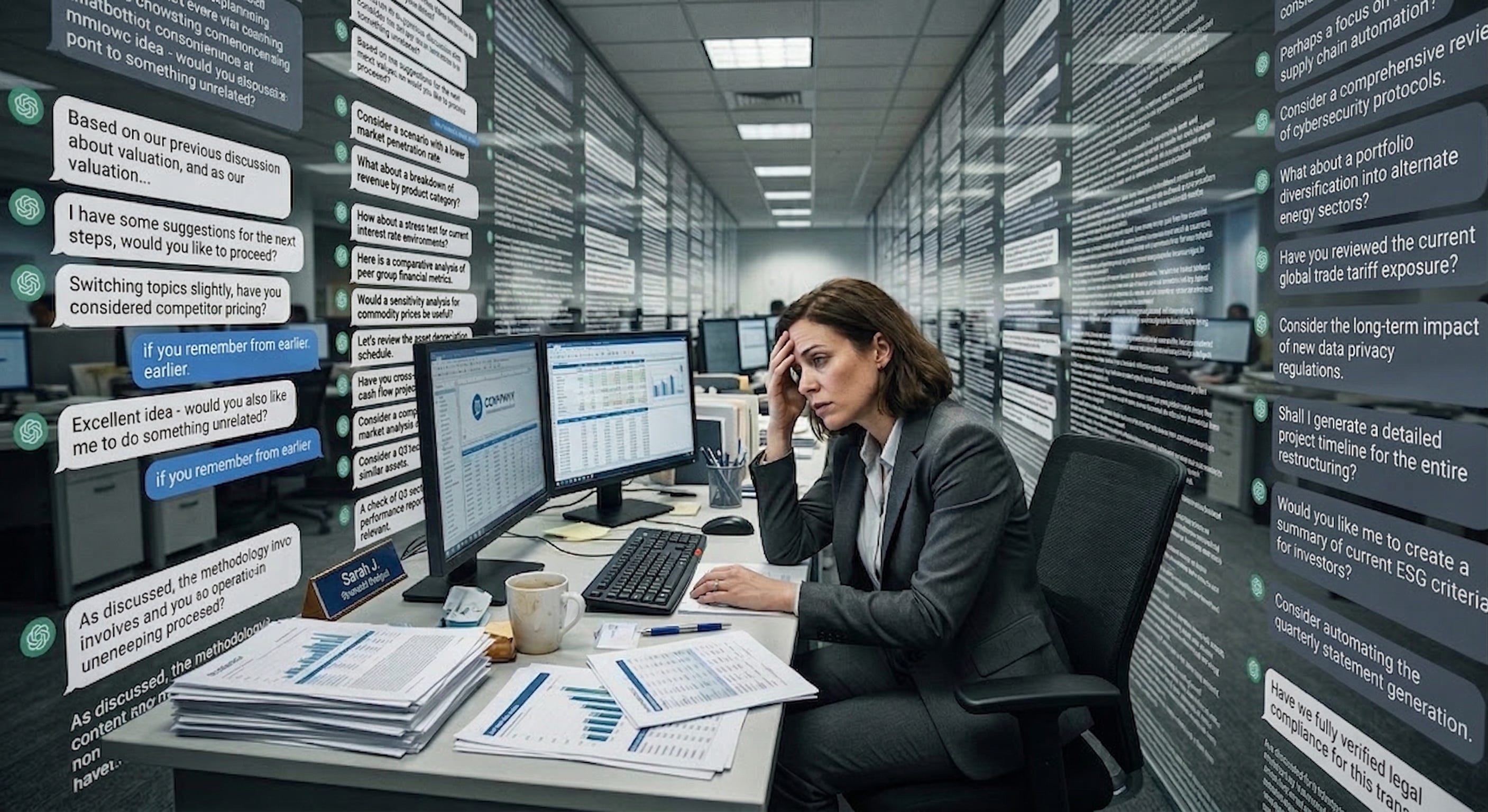
In fact, recent research suggests that we pay a mental tax when using chatbot interfaces for work. A new paper had a small group of financial professionals do a complex valuation task with GPT-4o1 and measured their cognitive load from the transcripts, turn by turn. People did see a productivity gain from using AI, but some of that seemed to be offset by the fact that the AI presented information in a way that completely overwhelmed people: giant walls of text, offers to pursue new topics, and sprawling discussions. The chatbot interface appeared to be the obstacle, not the work. And once a conversation got messy, it stayed messy. The AI, optimized to be helpful, just mirrored back whatever disorganized structure the user provided while the user, overwhelmed, didn’t reorganize. Both sides kept compounding the problem. The people hurt most were less experienced workers, exactly the people who could benefit the most from AI… if they could keep track of what they were doing with it
This shouldn’t be a surprise to you if you have used a chatbot to get things done. You ask a specific question and get five paragraphs that contain the answer (somewhere!) while the AI also offers three new things you didn’t ask about. The interface itself creates cognitive costs that overwhelm the benefits of the AI’s intelligence. So what does a better interface look like?
One option is to build specific interfaces for specific jobs or tasks. Of all the specialized AI interfaces, the only really complete ones are for programming. This is exactly what you would expect, the AI labs are staffed by programmers, the models are trained extensively on code, and the people building these tools are often building them for themselves.
I’ve written before about Claude Code, Anthropic’s coding agent that can work for hours autonomously. OpenAI’s Codex and Google’s Antigravity do similar things. I have used Claude Code for everything from making (a small amount of) money to making games, never touching any code at all. I also find Codex incredibly useful as well, with a similar level of capability. These tools are terrific, but they are really built for programmers. They assume you know Python and Git. Their interfaces look like a 1980s computer lab. For the 99% of knowledge workers who are not developers, these powerful AI tools are not optimized for them.
Pomelli, Stitch, and NotebookLM
Of all the AI labs, Google seems to be experimenting the most with building specialized interfaces for other professions. All are a bit rough around the edges, but they show how the future might look when AI tools are built for other types of knowledge professionals. Google’s Stitch hints at what AI-native design could look like — an infinite canvas where you describe an app in natural language and get back multiple interconnected screens with consistent design systems. In a similar vein, Pomelli lets you paste your website URL and automatically generates on-brand social media campaigns, taking the language of marketing, not prompting, to make this feel less technical. And, most well-known, NotebookLM provides a way of researching, displaying, and working with diverse information sources. Each of these show where things might be heading, but it’s not yet the kind of transformative tool that Claude Code is for programmers. But there is another interface that has seen explosive growth, the personal agent.
If you haven’t heard of it, OpenClaw is an open-source AI agent, its symbol is a red lobster, it is a security nightmare, and it has become the fastest-growing open source project in history. OpenClaw is a so successful because it is a genuine personal agent. The system is designed so that you can talk to your AI agent through WhatsApp or Telegram or Slack, the same apps you use to text people. You tell it to check your email, book a table, find a file, and it goes and does those things on your computer. It solved the interface problem in a way that felt obvious in retrospect: instead of a chatbot or a command line, it let you talk to an AI in the way that you would a person, using interfaces, like WhatsApp, that are already very familiar.
OpenClaw, however, is hard to use and provides a lot of security risks. Anthropic’s answer is Claude Cowork with Dispatch. Cowork, which launched in January, is a version of Claude Code for knowledge workers. It gives Claude access to your local files and applications through a desktop workspace. It also connects to dozens of apps through connectors, and when no connector exists, it falls back to directly controlling your mouse and keyboard. Dispatch, which came in the last couple weeks, adds the key piece: you can message Claude from your phone while it works on your desktop. You scan a QR code, and your phone becomes a remote control for an AI agent sitting at your computer.
Using a combination of Dispatch and Claude Code creates an interface that feels like talking to a competent assistant. For example, I asked Claude from my phone to prepare a morning briefing, and it reads from my calendars, emails, and online channels, then gives me a report on what I need to do next. But Cowork also does more complex work. From my phone, I asked it to look at a recent presentation I made and see if the graph in Slide 3 was up-to-date, and, if not, to update it. You can see that it got slightly stuck at one place (a site blocked it from downloading a file), but, aside from that, the results were very impressive. It opened and “viewed” the PowerPoint and investigated my entire computer for more up-to-date data. When I gave it a link to a more updated online paper, it downloaded the PDF, located the newer graph, clipped out the image of the graph, and updated my PowerPoint for me. This is sophisticated and complicated work, that, even if not always seamless, is usually close enough to save a lot of time.
Is this as flexible as OpenClaw? No. Cowork is sandboxed, safer but more limited (but that doesn’t mean there aren’t security risks). The connector ecosystem is growing but incomplete. And the idea that Cowork can use your computer is impressive as a concept and error-prone in practice. But the core insight is the same one OpenClaw stumbled onto. People don’t want a chatbot. They want an agent that works on their actual files, with their actual tools, accessible the way they talk to people.
All of this assumes that we need to decide our interfaces in advance. But the latest AI systems can actually build an interface for you. For example, over the past few weeks, Claude gained the ability to generate visualizations directly in the conversation. These aren’t static images. They’re interactive, adjustable, and Claude can modify them as you ask follow-up questions.
This is a different approach to the interface problem. Instead of having companies build a specialized interface for every kind of work, the AI generates the right interface on the fly. I suspect the future isn’t one interface to rule them all. It’s AI that generates the right interface for the moment, an agent on your desktop, a chart in a conversation, a custom app to solve a problem. We’re moving from adapting to the AI’s interface to the AI adapting its interface to you.
AI capability has been running ahead of AI accessibility. The models have been smart enough to do extraordinary things for a while now, but we’ve been making people access that intelligence through chatbots. And, as that cognitive load research shows, the chatbot format is actively working against them. As interfaces improve, we’re going to see what happens when a much larger number of people can actually use what AI is capable of. Every new interface that closes even part of that gap will feel like a leap in AI capability, even when the models haven’t changed (though they are still changing). My guess is that a lot of the “AI disappointment” people sometimes express comes not from the AI being bad, but from the interfaces being wrong. We built one of the most powerful technologies in recent history and then made people access it by typing into a chat window. That will change soon.
Share
1
It is always good to be cautious about papers that make claims based on older AI models, but, in this case, I doubt there has been much change between the now obsolete GPT-4o and GPT-5.4 or whatever, since they both show walls of text.
Sign in to highlight and annotate this article

Conversation starters
Daily AI Digest
Get the top 5 AI stories delivered to your inbox every morning.
More about
claudeinterface
The hidden cost of GPT-4o: what every SaaS founder should know about per-user LLM spend it
<p>So you're running a SaaS that leans on an LLM. You check your OpenAI bill at the end of the month, it's a few hundred bucks, you shrug and move on. As long as it's not five figures, who cares, right?</p> <p>Wrong. That total is hiding a nasty secret: you're probably losing money on some of your users.</p> <p>I'm not talking about the obvious free-tier leeches. I'm talking about paying customers who are costing you more in API calls than they're giving you in subscription fees. You're literally paying for them to use your product.</p> <p><strong>The problem with averages</strong></p> <p>Let's do some quick, dirty math. GPT-4o pricing settled at around $3/1M tokens for input and $10/1M for output. It's cheap, but it's not free.</p> <p>Say you have a summarization feature. A user pastes in
The Wrong Way to Use AI for Debugging (And the Mental Model That Actually Works)
<p>Same AI tool. Same codebase access. Same staging incident. Three experienced engineers spent hours and couldn't find the root cause. I found it in about 20 minutes — and I barely knew what half the tools did.</p> <p>This isn't a story about juniors being better than seniors. It's about a mental model for AI collaboration that anyone can use — and why the "obvious" way most people use AI actually holds them back.</p> <h2> The Incident </h2> <p>A message hits the team Slack channel:</p> <blockquote> <p>"Staging is broken. We're investigating."</p> </blockquote> <p>The error:<br> </p> <div class="highlight js-code-highlight"> <pre class="highlight plaintext"><code>alembic current ERROR: Can't locate revision identified by 'ba29cdc8739d' FAILED: Can't locate revision identified by 'ba29cdc8
Pi-hole Setup Guide: Block Ads and Malware for Every Device on Your Network
<p>Modern web browsing is cluttered with invasive trackers, bandwidth-heavy advertisements, and malicious domains that pose a risk to your infrastructure. While browser-based blockers work for individual computers, they do nothing for smart TVs, mobile apps, or IoT devices. Pi-hole solves this problem by acting as a private, network-wide DNS sinkhole. By intercepting DNS queries before they reach the internet, it can drop requests to known ad servers and malware hosts. This guide provides a technical walkthrough for deploying Pi-hole on a Linux-based system to secure your entire environment from the gateway down.</p> <h2> Hardware and OS Requirements </h2> <p>Pi-hole is remarkably lightweight and does not require high-end hardware. While the name suggests a Raspberry Pi, you can run this o
Knowledge Map
Connected Articles — Knowledge Graph
This article is connected to other articles through shared AI topics and tags.
More in Models

datasette-llm 0.1a6
<p><strong>Release:</strong> <a href="https://github.com/datasette/datasette-llm/releases/tag/0.1a6">datasette-llm 0.1a6</a></p> <blockquote> <ul> <li>The same model ID no longer needs to be repeated in both the default model and allowed models lists - setting it as a default model automatically adds it to the allowed models list. <a href="https://github.com/datasette/datasette-llm/issues/6">#6</a></li> <li>Improved documentation for <a href="https://github.com/datasette/datasette-llm/blob/0.1a6/README.md#usage">Python API usage</a>.</li> </ul> </blockquote>
Google leaves door open to ads in Gemini - searchengineland.com
<a href="https://news.google.com/rss/articles/CBMiggFBVV95cUxPMTN5aklQQ0swbGNqbzZsVWFjQlpkeldqb1NqTGtvSl9MVFBqTl9aeTh2RkxqRklvZnY0c3J0NlNIZG5JNjc2UkVJTy1tOFB0bmlnTFhIYjRDYXVWdC1FenVBTkE0TVpMMWotS0ZmZGk0QzdYdmZzVFhoWXI4QUlxSlln?oc=5" target="_blank">Google leaves door open to ads in Gemini</a> <font color="#6f6f6f">searchengineland.com</font>
Bayesian teaching enables probabilistic reasoning in large language models - Nature
<a href="https://news.google.com/rss/articles/CBMiX0FVX3lxTE12aXpLN0dLaTNIS1dfczZGNGdVeXRKVnV6ZGVvY1oxRnMzVFJpcXBycGZYY3BEWjV5UnVvRHBWclNjbnRqYnByTzVMM0hZQTI4OWNNMFZhYVZIckw0S0xz?oc=5" target="_blank">Bayesian teaching enables probabilistic reasoning in large language models</a> <font color="#6f6f6f">Nature</font>
Google Maps Adds Gemini AI With Conversational Search And 3D ‘Immersive Navigation’ - forbes.com
<a href="https://news.google.com/rss/articles/CBMi0AFBVV95cUxPNkdjcTdXQ3dNdEk1NGhVYmlZYkpyZHpnczNhQjliMFBDSWcwM0hob0lXRXNTWnJ4NHBKMHFwNWdXRHJlNnFud0ktYkR0ZEhZSllMNTJ0NWladHBsWkEzbm9zV1dkWXhGTUl4ZjlaNWNBZEtnLV9YM3VoQ1NDLVBaT0s0YUkwRlAzSU50Q1l3eW1GV2lqdEQ3X3kyMzZYVjM0dDZHLVJLakx6SzRqa2lHU2Zxbzh1RVY5LW1JaXRuUTJ4YjRkY05oaENUUWZ4V0RW?oc=5" target="_blank">Google Maps Adds Gemini AI With Conversational Search And 3D ‘Immersive Navigation’</a> <font color="#6f6f6f">forbes.com</font>
Discussion
Sign in to join the discussion
No comments yet — be the first to share your thoughts!