

Why I Built a Menu Bar App Instead of a Dashboard
Everyone who builds with AI eventually hits the same moment. You're deep in a coding session. Claude is flying. You're feeling productive. Then you open your API dashboard and the number hits you like a bucket of cold water. That happened to me. I don't want to talk about the exact number, but it was enough to make me stop and actually think about what I was doing. The problem wasn't that I was spending money. The problem was that I had no idea I was spending it. The dashboard problem My first instinct was what everyone does: open the Anthropic dashboard. Check the usage graphs. Try to correlate the spikes with what I was working on. But here's the thing about dashboards — they're designed for after-the-fact analysis, not real-time awareness. You go to a dashboard when something's already
Everyone who builds with AI eventually hits the same moment.
You're deep in a coding session. Claude is flying. You're feeling productive. Then you open your API dashboard and the number hits you like a bucket of cold water.
That happened to me. I don't want to talk about the exact number, but it was enough to make me stop and actually think about what I was doing.
The problem wasn't that I was spending money. The problem was that I had no idea I was spending it.
The dashboard problem
My first instinct was what everyone does: open the Anthropic dashboard. Check the usage graphs. Try to correlate the spikes with what I was working on.
But here's the thing about dashboards — they're designed for after-the-fact analysis, not real-time awareness. You go to a dashboard when something's already wrong. It's reactive, not preventive.
I tried setting up billing alerts too. Which helped, but it still didn't give me the in-the-moment feedback I actually wanted. I wanted to feel the cost as I was working, not find out about it 20 minutes later via email.
Why a menu bar?
I spend most of my day in my code editor. Terminal. Browser. The menu bar is the one UI element that's always visible regardless of what app I'm in.
When I'm writing a prompt, I want to glance up and see the token count growing in real time. When I'm about to send a massive context window to the model, I want to know before I hit send — not after.
A dashboard requires me to switch context. A menu bar widget doesn't.
It's the same reason CPU/RAM monitors have lived in the menu bar forever. You don't open Activity Monitor every five minutes to check if your computer is struggling. You just glance at the little graph and keep working.
Token usage is the same class of information — it's ambient, always-relevant, and you want it peripheral, not in your face.
What I built
So I built TokenBar — a macOS menu bar app that shows your LLM token usage in real time.
It hooks into your API activity and shows you a live counter right in the menu bar. Claude, GPT-4, whatever you're using. You can see your current session burn rate, your daily total, and you get a heads-up when you're approaching a threshold you set.
Nothing revolutionary. Just the information I wanted, in the place I was already looking.
The thing I didn't expect
Building it changed how I actually use AI.
When you can see tokens ticking up in real time, you start making different decisions. Do I really need to paste this entire file as context? Can I be more specific in this prompt? Is this follow-up question worth the cost or should I just test it myself?
It made me more intentional. Not stingy — I still use AI constantly. But intentional.
There's something about ambient feedback that changes behavior in a way that weekly reports never do. Same reason people spend less when they pay with cash vs. card — the friction of seeing it happen in real time is different from reviewing a statement.
For other solo devs
If you're building with AI on your own and you're not tracking your usage in real time, you're flying blind. The costs are real and they sneak up on you in the exact moments you're most focused.
You don't need a complex setup. You just need to see the number.
If you want to try what I built: tokenbar.site. It's a $5 one-time purchase, which is less than what one expensive mistake used to cost me in a day.
Sign in to highlight and annotate this article

Conversation starters
Daily AI Digest
Get the top 5 AI stories delivered to your inbox every morning.
More about
claudemodelproduct
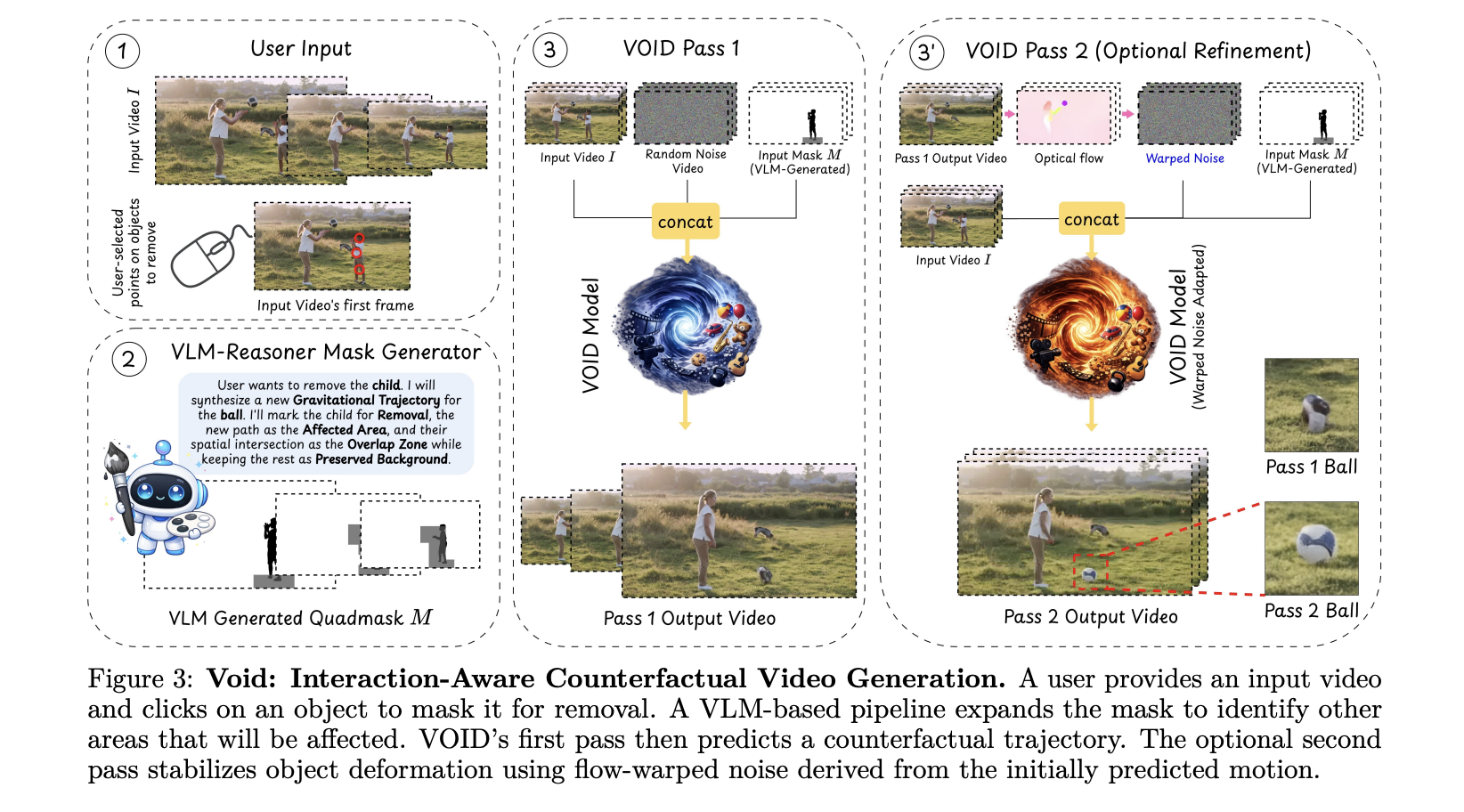
Netflix AI Team Just Open-Sourced VOID: an AI Model That Erases Objects From Videos — Physics and All
Video editing has always had a dirty secret: removing an object from footage is easy; making the scene look like it was never there is brutally hard. Take out a person holding a guitar, and you re left with a floating instrument that defies gravity. Hollywood VFX teams spend weeks fixing exactly this kind of problem. [ ] The post Netflix AI Team Just Open-Sourced VOID: an AI Model That Erases Objects From Videos — Physics and All appeared first on MarkTechPost .

Sharing Two Open-Source Projects for Local AI & Secure LLM Access 🚀
Hey everyone! I’m finally jumping into the dev.to community. To kick things off, I wanted to share two tools I’ve been developing at the University of Jaén that tackle two common headaches in the AI space: running out of VRAM, and keeping your API chats truly private. 🦥 Quansloth: TurboQuant Local AI Server The Problem: Standard LLM inference hits a "Memory Wall" with long documents. As context grows, your GPU runs out of memory (OOM) and crashes. The Solution: Quansloth is a fully private, air-gapped AI server that brings elite KV cache compression to consumer hardware. By bridging a Gradio Python frontend with a highly optimized llama.cpp CUDA backend, it prevents GPU crashes and lets you run massive contexts on a budget. Key Features: 75% VRAM Savings: Based on Google's TurboQuant (ICL
Knowledge Map
Connected Articles — Knowledge Graph
This article is connected to other articles through shared AI topics and tags.
More in Models

Netflix AI Team Just Open-Sourced VOID: an AI Model That Erases Objects From Videos — Physics and All
Video editing has always had a dirty secret: removing an object from footage is easy; making the scene look like it was never there is brutally hard. Take out a person holding a guitar, and you re left with a floating instrument that defies gravity. Hollywood VFX teams spend weeks fixing exactly this kind of problem. [ ] The post Netflix AI Team Just Open-Sourced VOID: an AI Model That Erases Objects From Videos — Physics and All appeared first on MarkTechPost .
Sharing Two Open-Source Projects for Local AI & Secure LLM Access 🚀
Hey everyone! I’m finally jumping into the dev.to community. To kick things off, I wanted to share two tools I’ve been developing at the University of Jaén that tackle two common headaches in the AI space: running out of VRAM, and keeping your API chats truly private. 🦥 Quansloth: TurboQuant Local AI Server The Problem: Standard LLM inference hits a "Memory Wall" with long documents. As context grows, your GPU runs out of memory (OOM) and crashes. The Solution: Quansloth is a fully private, air-gapped AI server that brings elite KV cache compression to consumer hardware. By bridging a Gradio Python frontend with a highly optimized llama.cpp CUDA backend, it prevents GPU crashes and lets you run massive contexts on a budget. Key Features: 75% VRAM Savings: Based on Google's TurboQuant (ICL
Discussion
Sign in to join the discussion
No comments yet — be the first to share your thoughts!