

No-Code vs. Custom Code: Which One Should You Actually Use for Your MVP?
No-code tools are genuinely impressive. For the right project, they're the smart choice. For the wrong project, they're a trap that wastes months of your life. Here's how to tell which one you're in. The no-code vs. custom code debate gets religious fast. No-code advocates say "why write code when you don't have to?" Custom code advocates say "you'll hit a wall and regret it." Both are right — in the right context. This isn't a hit piece on no-code. Tools like Webflow, Bubble, and Glide are genuinely powerful, and I recommend them to founders all the time. But I've also seen founders waste 6 months building in Bubble only to realize they've painted themselves into a corner. That's what this article is about. When No-Code Is the Right Choice No-code earns its place in specific scenarios. He
No-code tools are genuinely impressive. For the right project, they're the smart choice. For the wrong project, they're a trap that wastes months of your life. Here's how to tell which one you're in.
The no-code vs. custom code debate gets religious fast. No-code advocates say "why write code when you don't have to?" Custom code advocates say "you'll hit a wall and regret it."
Both are right — in the right context.
This isn't a hit piece on no-code. Tools like Webflow, Bubble, and Glide are genuinely powerful, and I recommend them to founders all the time. But I've also seen founders waste 6 months building in Bubble only to realize they've painted themselves into a corner. That's what this article is about.
When No-Code Is the Right Choice
No-code earns its place in specific scenarios. Here's where it genuinely shines:
You're validating an idea
If you're not sure people will pay for your product, the worst thing you can do is spend $10,000+ building it. No-code lets you simulate a product quickly and cheaply. A Webflow landing page, a Typeform intake flow, and a Notion database can fake most MVPs well enough to test demand.
Your product is content or marketing-led
Blogs, portfolio sites, landing pages, marketing sites — Webflow is unbeatable. If your "product" is primarily a publishing platform, no-code is the right call.
The logic is simple and linear
A simple booking flow, a basic intake form, a directory listing — if the workflow can be described in 5 steps with no branching logic, no-code handles it fine.
You have zero budget
If you genuinely have $0 and need something live this week, Bubble or Glide gets you there. Just go in knowing you'll likely rebuild it later.
When No-Code Becomes a Trap
This is where founders get burned.
The ceiling problem
No-code platforms are powerful within their constraints. The moment you need something outside those constraints — a custom API integration, a specific payment flow, a unique data relationship — you're stuck. You either accept the limitation or start hacking workarounds that make the platform increasingly fragile.
I've seen Bubble apps with 40+ plugins, each solving a limitation of the previous one. Changing anything breaks something else. It's a house of cards.
Performance at scale
No-code platforms optimize for flexibility, not performance. A Bubble app with 1,000 concurrent users is a different beast than a Next.js app with 1,000 concurrent users. Not impossible to handle, but you're fighting the tool instead of building your product.
You don't own the underlying code
This is the big one. With no-code, you own your data (usually), but you don't own the implementation. You're a tenant on someone else's platform. If Bubble changes its pricing, goes down, or shuts down, your business has a serious problem.
With custom code, you own 100% of the source. You can host it anywhere, modify anything, and never be held hostage by a platform.
Hiring becomes impossible
If your business grows and you want to hire a developer to extend the product, custom code is dramatically easier to work with. Finding a developer who specializes in Bubble is a niche skill. Finding a Next.js developer is not.
The Real Framework: What Are You Building?
Here's the honest decision tree:
Is this a marketing site or content platform? → Yes → Use Webflow. Done.Is this a marketing site or content platform? → Yes → Use Webflow. Done.Are you testing if people want this at all? → Yes → Use no-code to validate, plan to rebuild if it works.
Do you need custom business logic, complex data models, or specific integrations? → Yes → Custom code from the start.
Do you expect to scale beyond a few hundred users? → Yes → Custom code is safer long-term.
Is this your core product that the business depends on? → Yes → Custom code. Own your stack.`
Enter fullscreen mode
Exit fullscreen mode
The "Build Twice" Problem
The most common pattern I see: a founder builds in Bubble, gets to 50–200 users, hits a limitation they can't work around, and has to rebuild from scratch in custom code.
They've now paid twice. Once for the no-code build (time + platform fees), once for the real build. And they've lost months of potential growth while stuck on the limitation.
If you know upfront that your product has custom logic, specific integrations, or real scalability needs, start with custom code. The upfront cost is higher, but you only build it once.
A Practical Comparison
No-Code (Bubble) Custom Code
Time to first prototype Days Weeks
Cost to launch MVP $500–2,000 $5,000–15,000
Scalability Limited Unlimited
You own the code ✗ ✓
Hiring developers later Hard Easy
Custom integrations Limited Unlimited
Performance at scale Moderate High
Good for validation ✓ ✓
Good for production SaaS Sometimes ✓
My Actual Recommendation
Use no-code to validate. Use custom code to build.
If you're pre-revenue and unsure if your idea works — use Bubble, Glide, or Webflow. Get something in front of users as fast as possible. Prove the demand.
Once you have signal that people want it and will pay for it, rebuild properly with custom code. At that point, you know exactly what you need to build, you likely have some revenue to fund it, and you're not guessing anymore.
This isn't a cop-out answer — it's how the best founders approach it. Validate cheap, then build to last.
If you've validated your idea and you're ready to build the real version, book a free call. We'll scope it out and give you a fixed price — no hourly billing, no surprises.
Sign in to highlight and annotate this article

Conversation starters
Daily AI Digest
Get the top 5 AI stories delivered to your inbox every morning.
More about
modellaunchversion
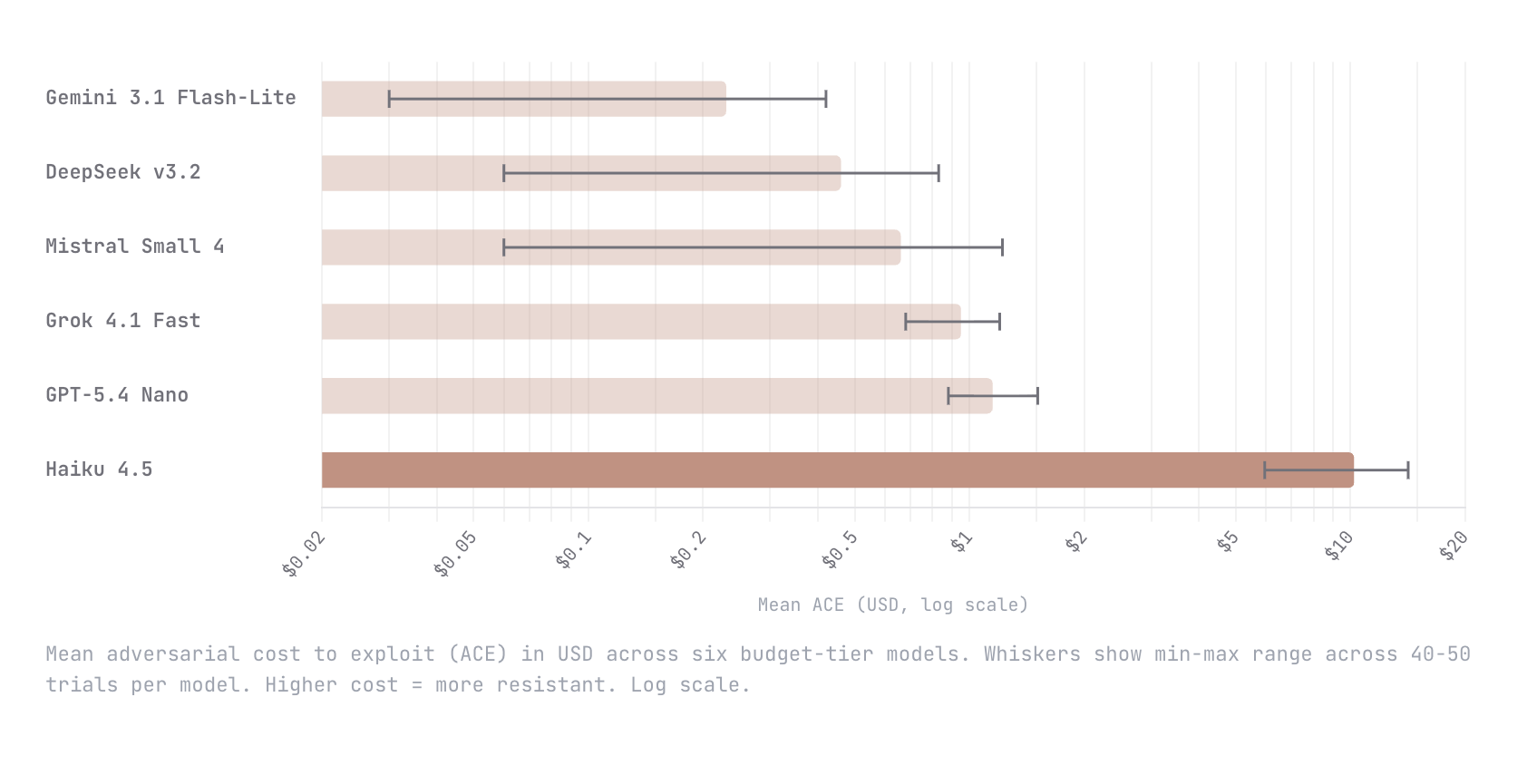
Show HN: ACE – A dynamic benchmark measuring the cost to break AI agents
We built Adversarial Cost to Exploit (ACE), a benchmark that measures the token expenditure an autonomous adversary must invest to breach an LLM agent. Instead of binary pass/fail, ACE quantifies adversarial effort in dollars, enabling game-theoretic analysis of when an attack is economically rational. We tested six budget-tier models (Gemini Flash-Lite, DeepSeek v3.2, Mistral Small 4, Grok 4.1 Fast, GPT-5.4 Nano, Claude Haiku 4.5) with identical agent configs and an autonomous red-teaming attacker. Haiku 4.5 was an order of magnitude harder to break than every other model; $10.21 mean adversarial cost versus $1.15 for the next most resistant (GPT-5.4 Nano). The remaining four all fell below $1. This is early work and we know the methodology is still going to evolve. We would love nothing

Intel B70 with Qwen3.5 35B
Intel recently released support for Qwen3.5: https://github.com/intel/llm-scaler/releases/tag/vllm-0.14.0-b8.1 Anyone with a B70 willing to run a lllama benchy with the below settings on the 35B model? uvx llama-benchy --base-url $URL --model $MODEL --depth 0 --pp 2048 --tg 512 --concurrency 1 --runs 3 --latency-mode generation --no-cache --save-total-throughput-timeseries submitted by /u/Fmstrat [link] [comments]
Knowledge Map
Connected Articles — Knowledge Graph
This article is connected to other articles through shared AI topics and tags.



Discussion
Sign in to join the discussion
No comments yet — be the first to share your thoughts!