
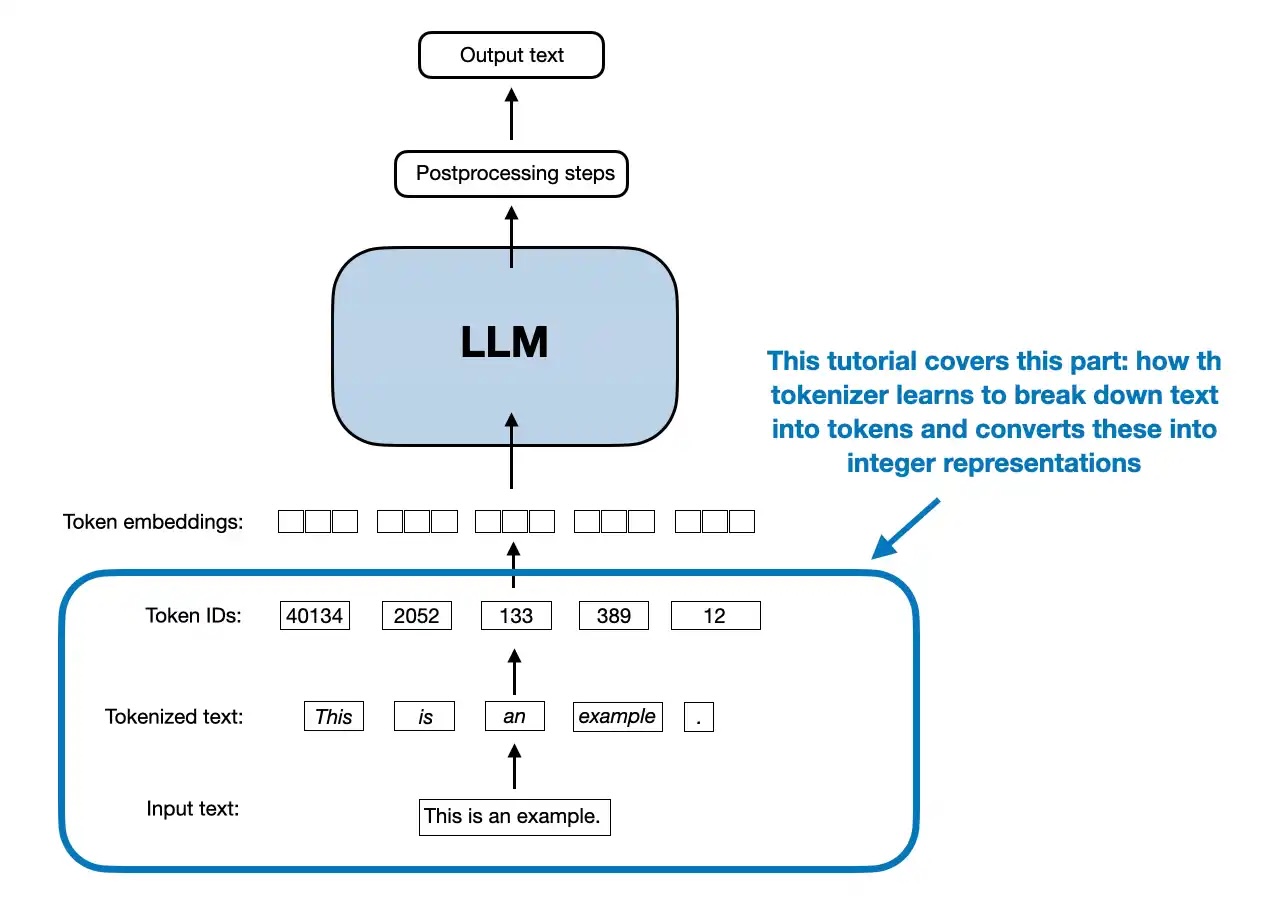
Implementing A Byte Pair Encoding (BPE) Tokenizer From Scratch
This is a standalone notebook implementing the popular byte pair encoding (BPE) tokenization algorithm, which is used in models like GPT-2 to GPT-4, Llama...
-
This is a standalone notebook implementing the popular byte pair encoding (BPE) tokenization algorithm, which is used in models like GPT-2 to GPT-4, Llama 3, etc., from scratch for educational purposes
-
For more details about the purpose of tokenization, please refer to Chapter 2; this code here is bonus material explaining the BPE algorithm
-
The original BPE tokenizer that OpenAI implemented for training the original GPT models can be found here
-
The BPE algorithm was originally described in 1994: “A New Algorithm for Data Compression” by Philip Gage
-
Most projects, including Llama 3, nowadays use OpenAI’s open-source tiktoken library due to its computational performance; it allows loading pretrained GPT-2 and GPT-4 tokenizers, for example (the Llama 3 models were trained using the GPT-4 tokenizer as well)
-
The difference between the implementations above and my implementation in this notebook, besides it being is that it also includes a function for training the tokenizer (for educational purposes)
-
There’s also an implementation called minBPE with training support, which is maybe more performant (my implementation here is focused on educational purposes); in contrast to minbpe my implementation additionally allows loading the original OpenAI tokenizer vocabulary and BPE “merges” (additionally, Hugging Face tokenizers are also capable of training and loading various tokenizers; see this GitHub discussion by a reader who trained a BPE tokenizer on the Nepali language for more info)
Code
A standalone code notebook can be found here.
1. The main idea behind byte pair encoding (BPE)
- The main idea in BPE is to convert text into an integer representation (token IDs) for LLM training (see Chapter 2)
1.1 Bits and bytes
-
Before getting to the BPE algorithm, let’s introduce the notion of bytes
-
Consider converting text into a byte array (BPE stands for “byte” pair encoding after all):
text = "This is some text" byte_ary = bytearray(text, "utf-8") print(byte_ary)text = "This is some text" byte_ary = bytearray(text, "utf-8") print(byte_ary)bytearray(b'This is some text')
- When we call list() on a bytearray object, each byte is treated as an individual element, and the result is a list of integers corresponding to the byte values:
ids = list(byte_ary) print(ids)ids = list(byte_ary) print(ids)[84, 104, 105, 115, 32, 105, 115, 32, 115, 111, 109, 101, 32, 116, 101, 120, 116]
-
This would be a valid way to convert text into a token ID representation that we need for the embedding layer of an LLM
-
However, the downside of this approach is that it is creating one ID for each character (that’s a lot of IDs for a short text!)
-
I.e., this means for a 17-character input text, we have to use 17 token IDs as input to the LLM:
print("Number of characters:", len(text)) print("Number of token IDs:", len(ids))print("Number of characters:", len(text)) print("Number of token IDs:", len(ids))Number of characters: 17 Number of token IDs: 17Number of characters: 17 Number of token IDs: 17-
If you have worked with LLMs before, you may know that the BPE tokenizers have a vocabulary where we have a token ID for whole words or subwords instead of each character
-
For example, the GPT-2 tokenizer tokenizes the same text (“This is some text”) into only 4 instead of 17 tokens: 1212, 318, 617, 2420
-
You can double-check this using the interactive tiktoken app or the tiktoken library:
import tiktoken
gpt2_tokenizer = tiktoken.get_encoding("gpt2") gpt2_tokenizer.encode("This is some text")
prints [1212, 318, 617, 2420]`
-
Since a byte consists of 8 bits, there are 28 = 256 possible values that a single byte can represent, ranging from 0 to 255
-
You can confirm this by executing the code bytearray(range(0, 257)), which will warn you that ValueError: byte must be in range(0, 256))
-
A BPE tokenizer usually uses these 256 values as its first 256 single-character tokens; one could visually check this by running the following code:
import tiktoken gpt2_tokenizer = tiktoken.get_encoding("gpt2")import tiktoken gpt2_tokenizer = tiktoken.get_encoding("gpt2")for i in range(300): decoded = gpt2_tokenizer.decode([i]) print(f"{i}: {decoded}") """ prints: 0: ! 1: " 2: # ... 255: � # <---- single character tokens up to here 256: t 257: a ... 298: ent 299: n """`
- Above, note that entries 256 and 257 are not single-character values but double-character values (a whitespace + a letter), which is a little shortcoming of the original GPT-2 BPE Tokenizer (this has been improved in the GPT-4 tokenizer)
1.2 Building the vocabulary
- The goal of the BPE tokenization algorithm is to build a vocabulary of commonly occurring subwords like 298: ent (which can be found in entangle, entertain, enter, entrance, entity, …, for example), or even complete words like
318: is 617: some 1212: This 2420: text318: is 617: some 1212: This 2420: text-
The BPE algorithm was originally described in 1994: “A New Algorithm for Data Compression” by Philip Gage
-
Before we get to the actual code implementation, the form that is used for LLM tokenizers today can be summarized as described in the following sections.
1.3 BPE algorithm outline
- Identify frequent pairs
- In each iteration, scan the text to find the most commonly occurring pair of bytes (or characters)
- Replace and record
-
Replace that pair with a new placeholder ID (one not already in use, e.g., if we start with 0…255, the first placeholder would be 256)
-
Record this mapping in a lookup table
-
The size of the lookup table is a hyperparameter, also called “vocabulary size” (for GPT-2, that’s 50,257)
- Repeat until no gains
-
Keep repeating steps 1 and 2, continually merging the most frequent pairs
-
Stop when no further compression is possible (e.g., no pair occurs more than once)
Decompression (decoding)
- To restore the original text, reverse the process by substituting each ID with its corresponding pair, using the lookup table
1.4 BPE algorithm example
1.4.1 Concrete example of the encoding part (steps 1 & 2 in section 1.3)
- Suppose we have the text (training dataset) the cat in the hat from which we want to build the vocabulary for a BPE tokenizer
Iteration 1
- Identify frequent pairs
In this text, “th” appears twice (at the beginning and before the second “e”)
- Replace and record
replace “th” with a new token ID that is not already in use, e.g., 256 the new text is: <256>e cat in <256>e hat
the new vocabulary is
0: ... ... 256: "th"0: ... ... 256: "th"Iteration 2
- Identify frequent pairs
In the text <256>e cat in <256>e hat, the pair <256>e appears twice
- Replace and record
replace <256>e with a new token ID that is not already in use, for example, 257. The new text is: <257> cat in <257> hat
The updated vocabulary is: 0: ... ... 256: "th" 257: "<256>e"
Iteration 3
- Identify frequent pairs
In the text <257> cat in <257> hat, the pair <257> appears twice (once at the beginning and once before “hat”).
- Replace and record
replace <257> with a new token ID that is not already in use, for example, 258. the new text is: <258>cat in <258>hat
The updated vocabulary is: 0: ... ... 256: "th" 257: "<256>e" 258: "<257> "
- and so forth
1.4.2 Concrete example of the decoding part (step 3 in section 1.3)
-
To restore the original text, we reverse the process by substituting each token ID with its corresponding pair in the reverse order they were introduced
-
Start with the final compressed text: <258>cat in <258>hat
-
Substitute <258> → <257> : <257> cat in <257> hat
-
Substitute <257> → <256>e: <256>e cat in <256>e hat
-
Substitute <256> → “th”: the cat in the hat
2. A simple BPE implementation
-
Below is an implementation of this algorithm described above as a Python class that mimics the tiktoken Python user interface
-
Note that the encoding part above describes the original training step via train(); however, the encode() method works similarly (although it looks a bit more complicated because of the special token handling):
-
Split the input text into individual bytes
-
Repeatedly find & replace (merge) adjacent tokens (pairs) when they match any pair in the learned BPE merges (from highest to lowest “rank,” i.e., in the order they were learned)
-
Continue merging until no more merges can be applied
-
The final list of token IDs is the encoded output
from collections import Counter, deque from functools import lru_cache import jsonfrom collections import Counter, deque from functools import lru_cache import jsonclass BPETokenizerSimple: def init(self):
Maps token_id to token_str (e.g., {11246: "some"})
self.vocab = {}
Maps token_str to token_id (e.g., {"some": 11246})
self.inverse_vocab = {}
Dictionary of BPE merges: {(token_id1, token_id2): merged_token_id}
self.bpe_merges = {}
For the official OpenAI GPT-2 merges, use a rank dict:
of form {(string_A, string_B): rank}, where lower rank = higher priority
self.bpe_ranks = {}
def train(self, text, vocab_size, allowed_special={"<|endoftext|>"}): """ Train the BPE tokenizer from scratch.
Args: text (str): The training text. vocab_size (int): The desired vocabulary size. allowed_special (set): A set of special tokens to include. """
Preprocess: Replace spaces with "Ġ"
Note that Ġ is a particularity of the GPT-2 BPE implementation
E.g., "Hello world" might be tokenized as ["Hello", "Ġworld"]
(GPT-4 BPE would tokenize it as ["Hello", " world"])
processed_text = [] for i, char in enumerate(text): if char == " " and i != 0: processed_text.append("Ġ") if char != " ": processed_text.append(char) processed_text = "".join(processed_text)
Initialize vocab with unique characters, including "Ġ" if present
Start with the first 256 ASCII characters
unique_chars = [chr(i) for i in range(256)] unique_chars.extend( char for char in sorted(set(processed_text)) if char not in unique_chars ) if "Ġ" not in unique_chars: unique_chars.append("Ġ")
self.vocab = {i: char for i, char in enumerate(unique_chars)} self.inverse_vocab = {char: i for i, char in self.vocab.items()}
Add allowed special tokens
if allowed_special: for token in allowed_special: if token not in self.inverse_vocab: new_id = len(self.vocab) self.vocab[new_id] = token self.inverse_vocab[token] = new_id
Tokenize the processed_text into token IDs
token_ids = [self.inverse_vocab[char] for char in processed_text]
BPE steps 1-3: Repeatedly find and replace frequent pairs
for new_id in range(len(self.vocab), vocab_size): pair_id = self.find_freq_pair(token_ids, mode="most") if pair_id is None: break token_ids = self.replace_pair(token_ids, pair_id, new_id) self.bpe_merges[pair_id] = new_id
Build the vocabulary with merged tokens
for (p0, p1), new_id in self.bpe_merges.items(): merged_token = self.vocab[p0] + self.vocab[p1] self.vocab[new_id] = merged_token self.inverse_vocab[merged_token] = new_id
def load_vocab_and_merges_from_openai(self, vocab_path, bpe_merges_path): """ Load pre-trained vocabulary and BPE merges from OpenAI's GPT-2 files.
Args: vocab_path (str): Path to the vocab file (GPT-2 calls it 'encoder.json'). bpe_merges_path (str): Path to the bpe_merges file (GPT-2 calls it 'vocab.bpe'). """
Load vocabulary
with open(vocab_path, "r", encoding="utf-8") as file: loaded_vocab = json.load(file)
Convert loaded vocabulary to correct format
self.vocab = {int(v): k for k, v in loaded_vocab.items()} self.inverse_vocab = {k: int(v) for k, v in loaded_vocab.items()}
Handle newline character without adding a new token
if "\n" not in self.inverse_vocab:
Use an existing token ID as a placeholder for '\n'
Preferentially use "<|endoftext|>" if available
fallback_token = next((token for token in ["<|endoftext|>", "Ġ", ""] if token in self.inverse_vocab), None) if fallback_token is not None: newline_token_id = self.inverse_vocab[fallback_token] else:
If no fallback token is available, raise an error
raise KeyError("No suitable token found in vocabulary to map '\n'.")
self.inverse_vocab["\n"] = newline_token_id self.vocab[newline_token_id] = "\n"
Load GPT-2 merges and store them with an assigned "rank"
self.bpe_ranks = {} # reset ranks with open(bpe_merges_path, "r", encoding="utf-8") as file: lines = file.readlines() if lines and lines[0].startswith("#"): lines = lines[1:]
rank = 0 for line in lines: pair = tuple(line.strip().split()) if len(pair) == 2: token1, token2 = pair
If token1 or token2 not in vocab, skip
if token1 in self.inverse_vocab and token2 in self.inverse_vocab: self.bpe_ranks[(token1, token2)] = rank rank += 1 else: print(f"Skipping pair {pair} as one token is not in the vocabulary.")
def encode(self, text, allowed_special=None): """ Encode the input text into a list of token IDs, with tiktoken-style handling of special tokens.
Args: text (str): The input text to encode. allowed_special (set or None): Special tokens to allow passthrough. If None, special handling is disabled.
Returns: List of token IDs. """ import re
token_ids = []
If special token handling is enabled
if allowed_special is not None and len(allowed_special) > 0:
Build regex to match allowed special tokens
special_pattern = ( "(" + "|".join(re.escape(tok) for tok in sorted(allowed_special, key=len, reverse=True)) + ")" )
last_index = 0 for match in re.finditer(special_pattern, text): prefix = text[last_index:match.start()] token_ids.extend(self.encode(prefix, allowed_special=None)) # Encode prefix without special handling
special_token = match.group(0) if special_token in self.inverse_vocab: token_ids.append(self.inverse_vocab[special_token]) else: raise ValueError(f"Special token {special_token} not found in vocabulary.") last_index = match.end()
text = text[last_index:] # Remaining part to process normally
Check if any disallowed special tokens are in the remainder
disallowed = [ tok for tok in self.inverse_vocab if tok.startswith("<|") and tok.endswith("|>") and tok in text and tok not in allowed_special ] if disallowed: raise ValueError(f"Disallowed special tokens encountered in text: {disallowed}")
If no special tokens, or remaining text after special token split:
tokens = [] lines = text.split("\n") for i, line in enumerate(lines): if i > 0: tokens.append("\n") words = line.split() for j, word in enumerate(words): if j == 0 and i > 0: tokens.append("Ġ" + word) elif j == 0: tokens.append(word) else: tokens.append("Ġ" + word)
for token in tokens: if token in self.inverse_vocab: token_ids.append(self.inverse_vocab[token]) else: token_ids.extend(self.tokenize_with_bpe(token))
return token_ids
def tokenize_with_bpe(self, token): """ Tokenize a single token using BPE merges.
Args: token (str): The token to tokenize.
Returns: List[int]: The list of token IDs after applying BPE. """
Tokenize the token into individual characters (as initial token IDs)
token_ids = [self.inverse_vocab.get(char, None) for char in token] if None in token_ids: missing_chars = [char for char, tid in zip(token, token_ids) if tid is None] raise ValueError(f"Characters not found in vocab: {missing_chars}")
If we haven't loaded OpenAI's GPT-2 merges, use my approach
if not self.bpe_ranks: can_merge = True while can_merge and len(token_ids) > 1: can_merge = False new_tokens = [] i = 0 while i < len(token_ids) - 1: pair = (token_ids[i], token_ids[i + 1]) if pair in self.bpe_merges: merged_token_id = self.bpe_merges[pair] new_tokens.append(merged_token_id)
Uncomment for educational purposes:
print(f"Merged pair {pair} -> {merged_token_id} ('{self.vocab[merged_token_id]}')")
i += 2 # Skip the next token as it's merged can_merge = True else: new_tokens.append(token_ids[i]) i += 1 if i < len(token_ids): new_tokens.append(token_ids[i]) token_ids = new_tokens return token_ids
Otherwise, do GPT-2-style merging with the ranks:
1) Convert token_ids back to string "symbols" for each ID
symbols = [self.vocab[id_num] for id_num in token_ids]
Repeatedly merge all occurrences of the lowest-rank pair
while True:
Collect all adjacent pairs
pairs = set(zip(symbols, symbols[1:])) if not pairs: break
Find the pair with the best (lowest) rank
min_rank = float("inf") bigram = None for p in pairs: r = self.bpe_ranks.get(p, float("inf")) if r < min_rank: min_rank = r bigram = p
If no valid ranked pair is present, we're done
if bigram is None or bigram not in self.bpe_ranks: break
Merge all occurrences of that pair
first, second = bigram new_symbols = [] i = 0 while i < len(symbols):
If we see (first, second) at position i, merge them
if i < len(symbols) - 1 and symbols[i] == first and symbols[i+1] == second: new_symbols.append(first + second) # merged symbol i += 2 else: new_symbols.append(symbols[i]) i += 1 symbols = new_symbols
if len(symbols) == 1: break
Finally, convert merged symbols back to IDs
merged_ids = [self.inverse_vocab[sym] for sym in symbols] return merged_ids
def decode(self, token_ids): """ Decode a list of token IDs back into a string.
Args: token_ids (List[int]): The list of token IDs to decode.
Returns: str: The decoded string. """ decoded_string = "" for i, token_id in enumerate(token_ids): if token_id not in self.vocab: raise ValueError(f"Token ID {token_id} not found in vocab.") token = self.vocab[token_id] if token == "\n": if decoded_string and not decoded_string.endswith(" "): decoded_string += " " # Add space if not present before a newline decoded_string += token elif token.startswith("Ġ"): decoded_string += " " + token[1:] else: decoded_string += token return decoded_string
def save_vocab_and_merges(self, vocab_path, bpe_merges_path): """ Save the vocabulary and BPE merges to JSON files.
Args: vocab_path (str): Path to save the vocabulary. bpe_merges_path (str): Path to save the BPE merges. """
Save vocabulary
with open(vocab_path, "w", encoding="utf-8") as file: json.dump(self.vocab, file, ensure_ascii=False, indent=2)
Save BPE merges as a list of dictionaries
with open(bpe_merges_path, "w", encoding="utf-8") as file: merges_list = [{"pair": list(pair), "new_id": new_id} for pair, new_id in self.bpe_merges.items()] json.dump(merges_list, file, ensure_ascii=False, indent=2)
def load_vocab_and_merges(self, vocab_path, bpe_merges_path): """ Load the vocabulary and BPE merges from JSON files.
Args: vocab_path (str): Path to the vocabulary file. bpe_merges_path (str): Path to the BPE merges file. """
Load vocabulary
with open(vocab_path, "r", encoding="utf-8") as file: loaded_vocab = json.load(file) self.vocab = {int(k): v for k, v in loaded_vocab.items()} self.inverse_vocab = {v: int(k) for k, v in loaded_vocab.items()}
Load BPE merges
with open(bpe_merges_path, "r", encoding="utf-8") as file: merges_list = json.load(file) for merge in merges_list: pair = tuple(merge["pair"]) new_id = merge["new_id"] self.bpe_merges[pair] = new_id
@lru_cache(maxsize=None) def get_special_token_id(self, token): return self.inverse_vocab.get(token, None)
@staticmethod def find_freq_pair(token_ids, mode="most"): pairs = Counter(zip(token_ids, token_ids[1:]))
if not pairs: return None
if mode == "most": return max(pairs.items(), key=lambda x: x[1])[0] elif mode == "least": return min(pairs.items(), key=lambda x: x[1])[0] else: raise ValueError("Invalid mode. Choose 'most' or 'least'.")
@staticmethod def replace_pair(token_ids, pair_id, new_id): dq = deque(token_ids) replaced = []
while dq: current = dq.popleft() if dq and (current, dq[0]) == pair_id: replaced.append(new_id)
Remove the 2nd token of the pair, 1st was already removed
dq.popleft() else: replaced.append(current)
return replaced`
- There is a lot of code in the BPETokenizerSimple class above, and discussing it in detail is out of scope for this notebook, but the next section offers a short overview of the usage to understand the class methods a bit better
3. BPE implementation walkthrough
-
In practice, I highly recommend using tiktoken as my implementation above focuses on readability and educational purposes, not on performance
-
However, the usage is more or less similar to tiktoken, except that tiktoken does not have a training method
-
Let’s see how my BPETokenizerSimple Python code above works by looking at some examples below (a detailed code discussion is out of scope for this notebook)
3.1 Training, encoding, and decoding
- First, let’s consider some sample text as our training dataset:
import os import urllib.requestimport os import urllib.requestdef download_file_if_absent(url, filename, search_dirs): for directory in search_dirs: file_path = os.path.join(directory, filename) if os.path.exists(file_path): print(f"{filename} already exists in {file_path}") return file_path
target_path = os.path.join(search_dirs[0], filename) try: with urllib.request.urlopen(url) as response, open(target_path, "wb") as out_file: out_file.write(response.read()) print(f"Downloaded {filename} to {target_path}") except Exception as e: print(f"Failed to download {filename}. Error: {e}") return target_path
verdict_path = download_file_if_absent( url=( "https://raw.githubusercontent.com/rasbt/" "LLMs-from-scratch/main/ch02/01_main-chapter-code/" "the-verdict.txt" ), filename="the-verdict.txt", search_dirs=["ch02/01_main-chapter-code/", "../01_main-chapter-code/", "."] )
with open(verdict_path, "r", encoding="utf-8") as f: # added ../01_main-chapter-code/ text = f.read()`
the-verdict.txt already exists in ../01_main-chapter-code/the-verdict.txt
-
Next, let’s initialize and train the BPE tokenizer with a vocabulary size of 1,000
-
Note that the vocabulary size is already 256 by default due to the byte values discussed earlier, so we are only “learning” 744 vocabulary entries (if we consider the <|endoftext|> special token and the Ġ whitespace token; so, that’s 742 to be precise)
-
For comparison, the GPT-2 vocabulary is 50,257 tokens, the GPT-4 vocabulary is 100,256 tokens (cl100k_base in tiktoken), and GPT-4o uses 199,997 tokens (o200k_base in tiktoken); they have all much bigger training sets compared to our simple example text above
tokenizer = BPETokenizerSimple() tokenizer.train(text, vocab_size=1000, allowed_special={"<|endoftext|>"})tokenizer = BPETokenizerSimple() tokenizer.train(text, vocab_size=1000, allowed_special={"<|endoftext|>"})- You may want to inspect the vocabulary contents (but note it will create a long list)
# print(tokenizer.vocab) print(len(tokenizer.vocab))# print(tokenizer.vocab) print(len(tokenizer.vocab))1000
- This vocabulary is created by merging 742 times (= 1000 - len(range(0, 256)) - len(special_tokens) - "Ġ" = 1000 - 256 - 1 - 1 = 742)
print(len(tokenizer.bpe_merges))
742
-
This means that the first 256 entries are single-character tokens
-
Next, let’s use the created merges via the encode method to encode some text:
input_text = "Jack embraced beauty through art and life." token_ids = tokenizer.encode(input_text) print(token_ids)input_text = "Jack embraced beauty through art and life." token_ids = tokenizer.encode(input_text) print(token_ids)[424, 256, 654, 531, 302, 311, 256, 296, 97, 465, 121, 595, 841, 116, 287, 466, 256, 326, 972, 46]
input_text = "Jack embraced beauty through art and life.<|endoftext|> " token_ids = tokenizer.encode(input_text) print(token_ids)input_text = "Jack embraced beauty through art and life.<|endoftext|> " token_ids = tokenizer.encode(input_text) print(token_ids)[424, 256, 654, 531, 302, 311, 256, 296, 97, 465, 121, 595, 841, 116, 287, 466, 256, 326, 972, 46, 60, 124, 271, 683, 102, 116, 461, 116, 124, 62]
input_text = "Jack embraced beauty through art and life.<|endoftext|> " token_ids = tokenizer.encode(input_text, allowed_special={"<|endoftext|>"}) print(token_ids)input_text = "Jack embraced beauty through art and life.<|endoftext|> " token_ids = tokenizer.encode(input_text, allowed_special={"<|endoftext|>"}) print(token_ids)[424, 256, 654, 531, 302, 311, 256, 296, 97, 465, 121, 595, 841, 116, 287, 466, 256, 326, 972, 46, 257]
print("Number of characters:", len(input_text)) print("Number of token IDs:", len(token_ids))print("Number of characters:", len(input_text)) print("Number of token IDs:", len(token_ids))Number of characters: 56 Number of token IDs: 21Number of characters: 56 Number of token IDs: 21-
From the lengths above, we can see that a 42-character sentence was encoded into 20 token IDs, effectively cutting the input length roughly in half compared to a character-byte-based encoding
-
Note that the vocabulary itself is used in the decode() method, which allows us to map the token IDs back into text:
print(token_ids)
[424, 256, 654, 531, 302, 311, 256, 296, 97, 465, 121, 595, 841, 116, 287, 466, 256, 326, 972, 46, 257]
print(tokenizer.decode(token_ids))
Jack embraced beauty through art and life.<|endoftext|>
- Iterating over each token ID can give us a better understanding of how the token IDs are decoded via the vocabulary:
for token_id in token_ids: print(f"{token_id} -> {tokenizer.decode([token_id])}")for token_id in token_ids: print(f"{token_id} -> {tokenizer.decode([token_id])}")424 -> Jack 256 -> 654 -> em 531 -> br 302 -> ac 311 -> ed 256 -> 296 -> be 97 -> a 465 -> ut 121 -> y 595 -> through 841 -> ar 116 -> t 287 -> a 466 -> nd 256 -> 326 -> li 972 -> fe 46 -> . 257 -> <|endoftext|>424 -> Jack 256 -> 654 -> em 531 -> br 302 -> ac 311 -> ed 256 -> 296 -> be 97 -> a 465 -> ut 121 -> y 595 -> through 841 -> ar 116 -> t 287 -> a 466 -> nd 256 -> 326 -> li 972 -> fe 46 -> . 257 -> <|endoftext|>-
As we can see, most token IDs represent 2-character subwords; that’s because the training data text is very short with not that many repetitive words, and because we used a relatively small vocabulary size
-
As a summary, calling decode(encode()) should be able to reproduce arbitrary input texts:
tokenizer.decode( tokenizer.encode("This is some text.") )tokenizer.decode( tokenizer.encode("This is some text.") )'This is some text.'
tokenizer.decode( tokenizer.encode("This is some text with \n newline characters.") )tokenizer.decode( tokenizer.encode("This is some text with \n newline characters.") )'This is some text with \n newline characters.'
3.2 Saving and loading the tokenizer
- Next, let’s look at how we can save the trained tokenizer for reuse later:
# Save trained tokenizer tokenizer.save_vocab_and_merges(vocab_path="vocab.json", bpe_merges_path="bpe_merges.txt")# Save trained tokenizer tokenizer.save_vocab_and_merges(vocab_path="vocab.json", bpe_merges_path="bpe_merges.txt")# Load tokenizer tokenizer2 = BPETokenizerSimple() tokenizer2.load_vocab_and_merges(vocab_path="vocab.json", bpe_merges_path="bpe_merges.txt")# Load tokenizer tokenizer2 = BPETokenizerSimple() tokenizer2.load_vocab_and_merges(vocab_path="vocab.json", bpe_merges_path="bpe_merges.txt")- The loaded tokenizer should be able to produce the same results as before:
print(tokenizer2.decode(token_ids))
Jack embraced beauty through art and life.<|endoftext|>
tokenizer2.decode( tokenizer2.encode("This is some text with \n newline characters.") )tokenizer2.decode( tokenizer2.encode("This is some text with \n newline characters.") )'This is some text with \n newline characters.'
3.3 Loading the original GPT-2 BPE tokenizer from OpenAI
- Finally, let’s load OpenAI’s GPT-2 tokenizer files
# Download files if not already present in this directory
Define the directories to search and the files to download
search_directories = ["ch02/02_bonus_bytepair-encoder/gpt2_model/", "../02_bonus_bytepair-encoder/gpt2_model/", "."]
files_to_download = { "https://openaipublic.blob.core.windows.net/gpt-2/models/124M/vocab.bpe": "vocab.bpe", "https://openaipublic.blob.core.windows.net/gpt-2/models/124M/encoder.json": "encoder.json" }
Ensure directories exist and download files if needed
paths = {} for url, filename in files_to_download.items(): paths[filename] = download_file_if_absent(url, filename, search_directories)`
vocab.bpe already exists in ../02_bonus_bytepair-encoder/gpt2_model/vocab.bpe encoder.json already exists in ../02_bonus_bytepair-encoder/gpt2_model/encoder.jsonvocab.bpe already exists in ../02_bonus_bytepair-encoder/gpt2_model/vocab.bpe encoder.json already exists in ../02_bonus_bytepair-encoder/gpt2_model/encoder.json- Next, we load the files via the load_vocab_and_merges_from_openai method:
tokenizer_gpt2 = BPETokenizerSimple() tokenizer_gpt2.load_vocab_and_merges_from_openai( vocab_path=paths["encoder.json"], bpe_merges_path=paths["vocab.bpe"] )tokenizer_gpt2 = BPETokenizerSimple() tokenizer_gpt2.load_vocab_and_merges_from_openai( vocab_path=paths["encoder.json"], bpe_merges_path=paths["vocab.bpe"] )- The vocabulary size should be 50257 as we can confirm via the code below:
len(tokenizer_gpt2.vocab)
50257
- We can now use the GPT-2 tokenizer via our BPETokenizerSimple object:
input_text = "This is some text" token_ids = tokenizer_gpt2.encode(input_text) print(token_ids)input_text = "This is some text" token_ids = tokenizer_gpt2.encode(input_text) print(token_ids)[1212, 318, 617, 2420]
print(tokenizer_gpt2.decode(token_ids))
This is some text
- You can double-check that this produces the correct tokens using the interactive tiktoken app or the tiktoken library:
import tiktoken
gpt2_tokenizer = tiktoken.get_encoding("gpt2") gpt2_tokenizer.encode("This is some text")
prints [1212, 318, 617, 2420]`
4. Conclusion
-
That’s it! That’s how BPE works in a nutshell, complete with a training method for creating new tokenizers or loading the GPT-2 tokenizer vocabular and merges from the original OpenAI GPT-2 model
-
I hope you found this brief tutorial useful for educational purposes; if you have any questions, please feel free to open a new Discussion here
Code
A standalone code notebook can be found here.
Sign in to highlight and annotate this article

Conversation starters
Daily AI Digest
Get the top 5 AI stories delivered to your inbox every morning.
More about
llamamodel

30 Days of Building a Small Language Model — Day 1: Neural Networks
Welcome to day one. Before I introduce tokenizers, transformers, or training loops, we start where almost all modern machine learning starts: the neural network. Think of the first day as laying down the foundation you will reuse for the next twenty-nine days. If you have ever felt that neural networks sound like a black box, this post is for you. We will use a simple picture is this a dog or a cat? and walk through what actually happens inside the model, in plain language. What is a neural network? A neural network is made of layers. Each layer has many small units. Data flows in one direction: each unit takes numbers from the previous layer, updates them, and sends new numbers forward. During training, the network adjusts itself so its outputs get closer to the correct answers on example
Knowledge Map
Connected Articles — Knowledge Graph
This article is connected to other articles through shared AI topics and tags.
More in Models

30 Days of Building a Small Language Model — Day 1: Neural Networks
Welcome to day one. Before I introduce tokenizers, transformers, or training loops, we start where almost all modern machine learning starts: the neural network. Think of the first day as laying down the foundation you will reuse for the next twenty-nine days. If you have ever felt that neural networks sound like a black box, this post is for you. We will use a simple picture is this a dog or a cat? and walk through what actually happens inside the model, in plain language. What is a neural network? A neural network is made of layers. Each layer has many small units. Data flows in one direction: each unit takes numbers from the previous layer, updates them, and sends new numbers forward. During training, the network adjusts itself so its outputs get closer to the correct answers on example
Discussion
Sign in to join the discussion
No comments yet — be the first to share your thoughts!