
Asus ZenWiFi BD5 Outdoor Wi-Fi 7 extender review: Great outdoor wireless performance, as long as you use an Ethernet backhaul
Asus ZenWiFi BD5 Outdoor Wi-Fi 7 extender review: Great outdoor wireless performance, as long as you use an Ethernet backhaul
While the price is right, performance using the wireless backhaul on the ZenWiFi BD5 Outdoor was less than thrilling.
Pros
- Strong wired backhaul performance
Broad compatibility with Asus AiMesh hardware
Mounting hardware included
Easy setup using the Asus Router app
Cons
Spotty performance using wireless backhaul
Why you can trust Tom's Hardware
Our expert reviewers spend hours testing and comparing products and services so you can choose the best for you. Find out more about how we test.
We've reviewed a couple of outdoor-oriented Wi-Fi 7 satellite over the past year, both of which were made by TP-Link. The Deco BE25-Outdoor is a dual-band satellite, while the Deco BE65-Outdoor is its tri-band sibling. We now have a third product to add to the mix: the ZenWiFi BD5 Outdoor.
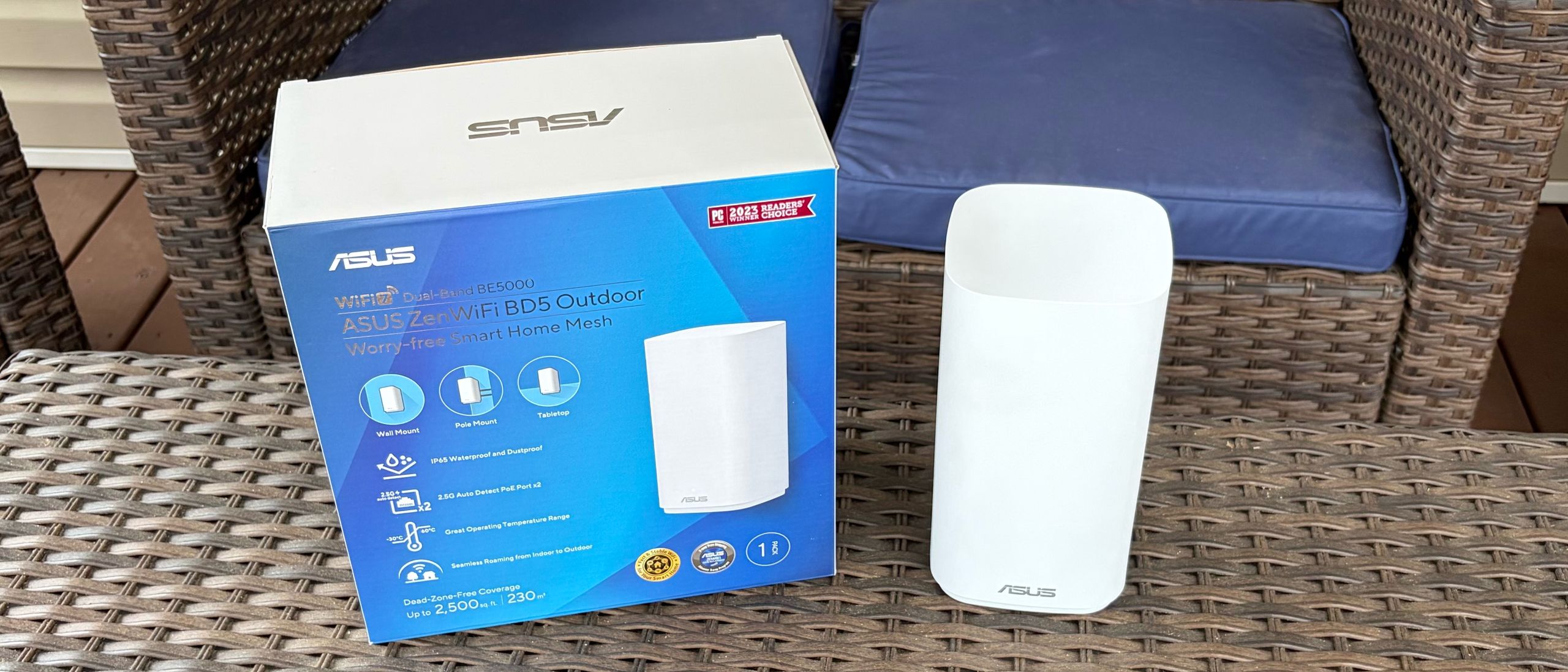
The ZenWiFi BD5 Outdoor is a dual-band Wi-Fi 7 satellite and, as its name suggests, is designed for outdoor use to blanket your yard with wireless coverage. The satellite is compatible with Asus wireless routers that support AiMesh. It also sells for around $140, making it a relatively affordable way to expand wireless coverage outside your home.
Design of the Asus ZenWiFi BD5 Outdoor
The ZenWiFi BD5 Outdoor has a simple tower design and is constructed of white plastic. There’s an Asus logo at the bottom front of the unit and a single status LED above. On the back of the unit, you'll find a power port and two 2.5 GbE ports that support Power over Ethernet (PoE).
Given that the ZenWiFi BD5 Outdoor is designed for outdoor use, Asus includes a plastic mounting bracket, four mounting screws, and four plastic screw anchors for mounting to drywall. The bracket also features three weather-resistant rubber plugs that can be used to close off ports you aren't using on the satellite. Also included is a single 2.5-foot power cable.
The ZenWiFi BD5 Outdoor measures 7.9 × 4.2 × 4.2 inches and weighs 2.3 pounds.
Asus ZenWiFi BD5 Outdoor Specifications
Swipe to scroll horizontally
MSRP
Wi-Fi Standard
of Bands
2.4 GHz Speeds
5 GHz Speeds
6 GHz Speeds
Coverage
Ports (Router)
Asus ZenWiFi BD5 Outdoor
$179.99
Wi-Fi 7
2
688 Mbps
4,323 Mbps
2,500 sq ft
2 x 2.5G, LAN
TP-Link Deco BE65-Outdoor
$299.99
Wi-Fi 7
3
688
4324
5765
3,000 sq ft
2 x 2.5G, LAN, 1x USB
TP-Link Deco BE25-Outdoor
$149.99
Wi-Fi 7
2
688 Mbps
4324 Mbps
2,800 sq ft
2 x 2.5G, LAN
Setting up the Asus ZenWiFi BD5 Outdoor
For my testing purposes, I used the included bracket to mount the ZenWiFi BD5 Outdoor to the same tree in my backyard that I used for TP-Link Deco BE65-Outdoor testing. The tree is located 25 feet from the main router, with one exterior wall separating the two. Since I already had an Asus ROG Rapture GT-BE19000Ai review unit on my desk, and it supports AiMesh, it served as the main router for this review.
Given the temporary installation for this review unit, I used a 50-foot extension cord plugged into an exterior wall outlet. I then plugged the ZenWiFi BD5 Outdoor’s power plug into the extension cable.
Image
1
of
5
(Image credit: Tom's Hardware)
Since the ROG Rapture GT-BE19000Ai was already configured via the Asus Router app on my smartphone, adding the ZenWiFi BD5 Outdoor was a simple affair. From the app home screen, you tap the “+” button in the top-right corner. Then you tap on “Add AiMesh node.” Next, the app will attempt to locate the ZenWiFi BD5 Outdoor, which it did for me in about 30 seconds.
After the ZenWiFi BD5 Outdoor was found, the automatic configuration process took another 5 minutes or so to complete. Once finished, it showed that it was connecting to the main ROG Rapture GT-BE19000Ai router with a 5 GHz uplink.
Image
1
of
2
Adding the ZenWiFi BD5 Outdoor to an AiMesh network with the Asus Router app(Image credit: Tom's Hardware)
I also performed separate tests using a 100-foot CAT6e cable, connecting the ROG Rapture GT-BE19000Ai to the ZenWiFi BD5 Outdoor. When the two network devices are connected via a cable, the uplink automatically switches from wireless (5 GHz) to Ethernet.
There are two locations I use for our outdoor wireless satellite testing: my back porch and my fire pit, which is 20 feet farther away. I included baseline testing to measure performance when connected solely to the ROG Rapture GT-BE19000Ai. I then performed tests with a laptop, wirelessly connecting to the ZenWiFi BD5 Outdoor using wired and wireless backhauls.
Wireless testing relied on an HP OmniBook X (Qualcomm Snapdragon X Elite) laptop with a Qualcomm FastConnect 6900 Wi-Fi 6E wireless card. Our venerable iPerf3 server was connected to the ROG Rapture GT-BE19000Ai via a 10 Gbps Ethernet connection. I will note that Asus claims that the ROG Rapture GT-BE19000Ai offers 3,500 sq ft of wireless coverage, while the ZenWiFi BD5 Outdoor covers an additional 2,500 sq ft.
Image
1
of
2
(Image credit: Tom's Hardware)
Baseline performance when connecting the OmniBook X to the ROG Rapture GT-BE19000Ai was 222 Mbps on my porch and 124 Mbps at the fire pit on the 5 GHz band, using our iPerf3 throughput test. Switching over to the 2.4 GHz band, the numbers fell to 34 Mbps and 20 Mbps, respectively.
Interestingly, 5 GHz performance on the back porch was more than cut in half with the ZenWiFi BD5 Outdoor, compared to connecting natively to the ROG Rapture GT-BE19000Ai. The only thing I can think of is that the ROG Rapture GT-BE19000Ai was already providing a good enough signal. Plus, there’s added latency involved in maintaining the 5 GHz uplink between the router and satellite, which can impact client performance. On the positive side, performance was only slightly less (118 Mbps) at my fire pit. Also in the plus column, 2.4 GHz performance was higher across the board, with 39 Mbps on my back porch and 43 Mbps at the fire pit.
Unsurprisingly, I observed the best performance when connecting the ROG Rapture GT-BE19000Ai and ZenWiFi BD5 Outdoor via a CAT6e cable. Using this setup, 5 GHz performance on the porch jumped to 470 Mbps, while I saw 196 Mbps at the fire pit. Performance on the 2.4 GHz band also spiked to an average of 84 Mbps on the back porch.
Bottom Line
Asus’s networking portfolio is vast, and the ZenWiFi BD5 Outdoor is the latest solution to hit the Wi-Fi 7 market segment. Although your mileage may vary with setting it up as a satellite using a wireless uplink to an AiMesh router, wireless performance in my testing was subpar and, in some instances, slower than when connecting directly to the main router (an ROG Rapture GT-BE19000Ai).
However, customers with the wherewithal to install a wireless satellite in their yard and plan to run an Ethernet line using PoE will experience much higher throughput. The ZenWiFi BD5 has an MSRP of $179.99, but it’s currently selling for $139.99 at B&H Photo. With the caveat that you plan on using a wired backhaul, the ZenWiFi BD5 is a worthwhile investment for adding outdoor coverage to your AiMesh network.
Brandon Hill is a senior editor at Tom's Hardware. He has written about PC and Mac tech since the late 1990s with bylines at AnandTech, DailyTech, and Hot Hardware. When he is not consuming copious amounts of tech news, he can be found enjoying the NC mountains or the beach with his wife and two sons.
tomshardware.com
https://www.tomshardware.com/networking/routers/asus-zenwifi-bd5-outdoor-wi-fi-7-extender-reviewSign in to highlight and annotate this article

Conversation starters
Daily AI Digest
Get the top 5 AI stories delivered to your inbox every morning.
More about
review
STEEP: Your repo's fortune, steeped in truth.
This is a submission for the DEV April Fools Challenge What I Built Think teapot. Think tea. Think Ig Nobel. Think esoteric. Think absolutely useless. Think...Harry Potter?...Professor Trelawney?...divination! Tea leaf reading. For GitHub repos. That's Steep . Paste a public GitHub repo URL. Steep fetches your commit history, file tree, languages, README, and contributors. It finds patterns in the data and maps them to real tasseography symbols, the same symbols tea leaf readers have used for centuries. Mountain. Skull. Heart. Snake. Teacup. Then Madame Steep reads them. Madame Steep is an AI fortune teller powered by the Gemini API. She trained at a prestigious academy (she won't say which) and pivoted to software divination when she realized codebases contain more suffering than any teac
![[D] KDD Review Discussion](https://d2xsxph8kpxj0f.cloudfront.net/310419663032563854/konzwo8nGf8Z4uZsMefwMr/default-img-wave-pattern-4YWNKzoeu65vYpqRKWMiWf.webp)
[D] KDD Review Discussion
KDD 2026 (Feb Cycle) reviews will release today (4-April AoE), This thread is open to discuss about reviews and importantly celebrate successful reviews. Let us all remember that review system is noisy and we all suffer from it and this doesn't define our research impact. Let's all prioritise reviews which enhance our papers. Feel free to discuss your experiences submitted by /u/BomsDrag [link] [comments]

How I Track My AI Spending as a Solo Dev (Without Going Broke)
I ship solo. No team, no finance department, no one reviewing expenses but me. When I started using LLMs heavily in my workflow — Claude for code review, GPT for drafts, a bit of Gemini here and there — I told myself I'd keep a close eye on costs. I had a vague sense of what I was spending. Turns out "a vague sense" doesn't cut it when you're getting invoiced. So I built a system. Or rather, I cobbled one together after getting burned. The Moment That Changed How I Think About This I was three weeks into a heavy coding sprint. I had Claude open basically all day — asking it to review diffs, explain errors, help me write tests. Normal stuff. Then my monthly statement hit. Not catastrophic, but more than I'd mentally budgeted. The frustrating part wasn't the money. It was that I had zero vis
Knowledge Map
Connected Articles — Knowledge Graph
This article is connected to other articles through shared AI topics and tags.

Discussion
Sign in to join the discussion
No comments yet — be the first to share your thoughts!