
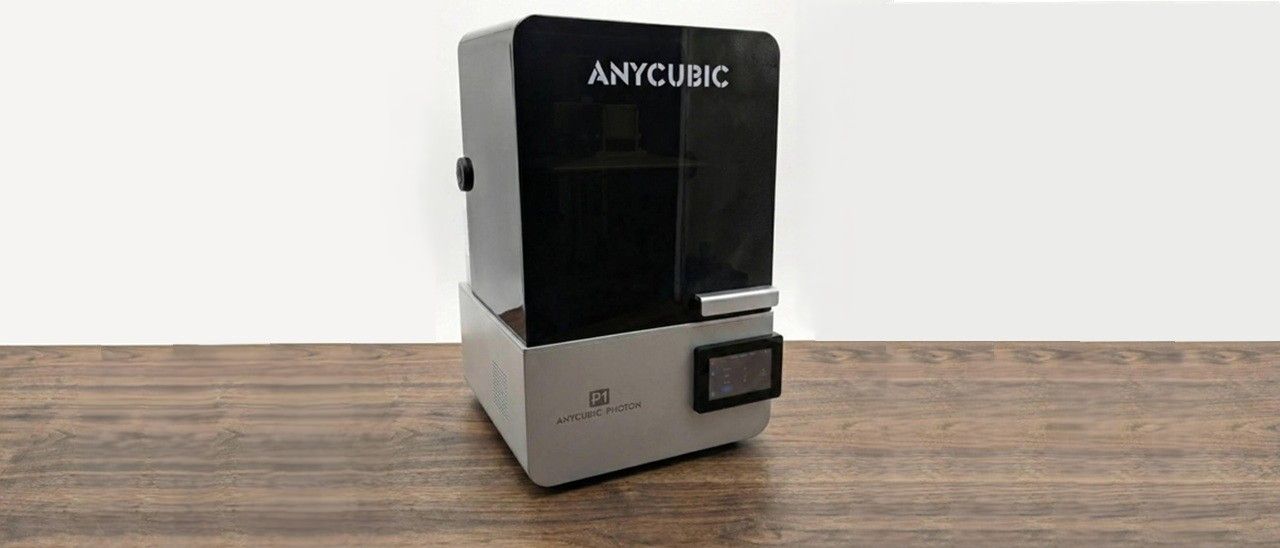
Anycubic Photon P1 Review: Dual Color/Dual Material, Tech Loaded
Anycubic Photon P1 Review: Dual Color/Dual Material, Tech Loaded
Anycubic’s Photon P1 resin printer is packed with new tech for all your resin printing needs, including a heated vat, Wave Release technology, and dual-material capabilities.
Pros
Wave Release film
Heated Vat
Dual-material support
Smart Dynamic Balance 3.0
Cons
No auto-refill system
AI features can be a little touchy
Slicing for the dual build plate is glitchy
Why you can trust Tom's Hardware
Our expert reviewers spend hours testing and comparing products and services so you can choose the best for you. Find out more about how we test.
Anycubic’s latest Photon P1 includes a ton of tech and AI features, making it stand out as one of the most feature-packed prosumer-level printers in its $699 price range. It’s also one of the most user-friendly resin printers I have used to date, and priced within the range of similar-sized alternatives, making it a hard printer to beat.
The resin scene has been slowly adding new tech to printers to help users get the best printing experience out of the box, and I think that Anycubic has hit that on the head with the Photon P1.
Specs
Swipe to scroll horizontally
Build Volume
223 x 126 x 230 mm (8.7 x 4.9 x 9.0inches)
Row 0 - Cell 2
LCD Screen
10.1-inch 14k monochrome
Row 1 - Cell 2
Light Source
COB (Chip On Board) + Reflector + Fresnel Collimating Lens
Row 2 - Cell 2
X/Y Axis Resolution
16.8 x 24.8μm
Row 3 - Cell 2
Normal Exposure Time
2.0 seconds
Row 4 - Cell 2
Interface
4.5-inch touch panel
Row 5 - Cell 2
Connectivity
USB, WiFi
Row 6 - Cell 2
Machine Footprint
366 x 338 x 539 mm (14.4 x 13.3 x 21.2 inches)
Row 7 - Cell 2
Machine Weight
13.5kg (29.76 lbs)
Row 8 - Cell 2
Release Date
December 11, 2025 on Kickstarter
Row 9 - Cell 2
MSRP
$699
Row 10 - Cell 2
Included in the Box: Anycubic Photon P1
(Image credit: Tom's Hardware)
The Anycubic Photon P1 ships with your standard resin printer starter accessories, and not much else. You do get a USB thumb drive loaded with Anycubic’s Photon Workshop slicing software and a PDF of the manual.On the back of the printer is a spot to add a hose for venting out any unwanted resin fumes (hose not included).
(Image credit: Tom's Hardware)
Printing Safety with Anycubic Photon P1
(Image credit: Tom's Hardware)
The Anycubic Photon P1 requires the same safety precautions as other resin printers. Uncured resin is dangerous, and the solvents used to clean your prints can be irritating to the skin. Use gloves and safety glasses when pouring resin and handling uncured prints.
Make sure the room you use your resin printer in is well-ventilated to avoid inhaling fumes. Spilled or dripped resin should be immediately cleaned with 99% isopropyl alcohol. After printing, make sure to wipe down your printer and bottles to remove smudges of uncured resin. Always keep your resin tightly sealed and safely stored out of reach of pets and children.
Assembling the Anycubic Photon P1
(Image credit: Tom's Hardware)
The Anycubic P1 comes fully assembled out of the box. You’ll just need to remove the packing material from the build plate area and peel the screen protectors and labels off the printer.
If you choose any add-ons, such as the perforated build plate or dual-material build plate system for this printer, those will be supplied in separate boxes.
Calibrating the Build Plate on the Anycubic Photon P1
On the screen here, you can see two of our favorite features of the P1, the Intelligent Leveling System 3.0 and the Smart Dynamic Balance System. (Image credit: Tom's Hardware)
The P1 started running its checks and was notified of an anomaly when checking the level of the bed on the right build plate, saying it was slightly off where it wanted to be. The printer then walked me through the steps of leveling the build plate.
I was not expecting the printer to rely on a pressure system for leveling. There’s no more having to grab your paper and level one by one with this printer. As you adjust the screws by turning them in or backing them away, the system updates on the screen, telling you if you’re getting closer to level or not. The calibration process overall makes things much easier than previous resin printers for anyone to jump in and understand how to get started.
Design of the Anycubic Photon Mono P1
(Image credit: Tom's Hardware)
The Anycubic Photon P1 is not your typical Anycubic Printer. It’s marketed as a prosumer-level printer, and it shows in many areas. The vat is built of high-quality aluminium, and its locking system is very unique. Iit does away with the standard screw-down style, and instead has a dual slide-out, lock-in-place system. The same upgrade can be found with the build plate locking system, as the common screw-style locks for the vat are now swapped for a slide lock system. These upgrades alone make this printer stand out already and make it a fantastic upgrade for those with an older model. No more loose screws and no more lost vat screws in the vat – yippee!
The vat comes with an integrated drip system for smaller prints. Our test machine included an extra print for an add-on drip mount that attaches to the side of the vat for longer prints to drip. It’s a nice addition, but ultimately seems a bit clunky and an obvious afterthought.
(Image credit: Tom's Hardware)
Anycubic states that the P1’s heated vat can keep 1000ml of resin controlled at up to 40 degrees C (104 Fahrenheit). This is great for those who have their printers in colder climates. The system can take about 5 minutes to reach the desired temperatures when it’s below -15 C (5 degrees F).
(Image credit: Anycubic)
The Anycubic Photon P1 uses USB, or you can print directly from the Slicer or Anycubic App via Wi-Fi. Wi-Fi support is common in most modern printers these days, but it’s still very convenient.
The Touch display is well thought out and simple to use. At 4.5 inches, it’s small enough not to overtake the entire look of the machine, but still big enough to be comfortable for your eyes and fingers to use. One quirky thing I must point out, though, is the sound the Anycubic’s screen makes when it’s pressed; it sounds like a microwave. I personally disable the sound on printers. With how many I have, it would drive me up the wall, but this one almost deserves to be kept enabled for fun.
Slicers Compatible with the Anycubic Photon P1
(Image credit: Tom's Hardware)
The Anycubic Photon P1 comes with the company’s latest version of Photon Workshop.
This is the only software at the moment that lets you use the dual-material function. While I am normally against company-specific slicer software, Anycubic has done an amazing job making this as user-friendly as possible. I was actually taken aback at how comfortable I was using it, and how many features it includes.
If you don’t want to use Anycubic’s software, though, Lychee recently announced that the single-plate setup can now be used with their slicer, with dual-material plate support in the works. Chitubox doesn’t support the Anycubic Photon P1 yet, but I suspect it will be added at some point.
Washing and Curing Your Prints PSA
Before you can admire your prints, you’ll need to wash them with isopropyl alcohol and cure with UV light. I like to give prints a 30-second hand rinse in a container of 95% Isopropyl alcohol, then a 2-minute rinse in the Anycubic Wash and Cure, which is sold separately and retails for $249 at Anycubic.com.
Completely dry the print with a hair dryer on cool – IPA left on the print will turn white. You can also let the print air dry in a place away from sunlight.
Supports are easier to remove before curing because they are softer. Clip the supports off with side cutters and use tweezers to remove stubborn supports. Remember to always wear gloves while handling uncured prints.
Then place the print in a UV curing station for 15 minutes, or outside in bright sunlight for a few hours.
Your IPA should never be flushed down the drain, especially after being contaminated with uncured resin. Instead, keep using the resin until it’s too dirty, then leave the container open to evaporate. The remaining sludge can be cured with UV light or the sun before being thrown away.
Supports should also be cured before being thrown away.
Sample Prints on the Anycubic Photon P1
Xiao, Chinese Traditional Flute, G Key, 8 Holes by 起若乘风 (Image credit: Tom's Hardware)
Using Anycubic’s Standard Resin in White, I decided to showcase something that a lot of people are not aware that resin printers can do: printing musical instruments. This Flute is a prime example of how easily we can keep music alive and affordable for everyone. This print turned out perfect, with the help of the Anycubic Slicer’s automatic supports. Very little cleanup was needed, and it fit together perfectly once washed and cured.
This was printed with standard 0.050 settings and was done in roughly 8 hours and 10 minutes. It also only took 210 ml of resin, which at about $5, is about half the price of a similar flute of its style. Another difference here is that if the flute gets broken into parts that can be easily reprinted, and can also be customized to each user.
Kuromi Oscura: Guardiana de la Medianoche by Ark3D (Image credit: Tom's Hardware)
Another print I decided to do was a Kuromi model. Again, printing with standard resin at 0.050 layer height. This printed perfectly. With a little modification to make it hollow and adding in some holes to allow the resin to drain out of it the supports. This print came in at just under 11hrs, using 258 ml of resin. I have a little one who was happy with the results and is excited to paint it.
Lastly, to showcase the dual-platform setup, I decided to cater to some of my fellow Pokémon nerds. I loaded up ornamental versions of Pikachu and Bulbasaur to commemorate the choice of some of the first Pokémon. I printed these in standard 0.050, with some yellow and green resin from Funcrecool.
This is a prime example of what this build plate setup is used for. I went from printing a large-scale model in white to two smaller models in two different colors. And this all happened within a 30 min window, from swapping from the white resin, cleanup, setup of the dual plate and vat, loading the colors, and then loading models to print. That’s pretty fast.
Setting up the prints in the slicer was a bit challenging though, due to the system defaulting the print center as the center of the plate and not each side. All I needed to do was scale down both models to what I wanted, and then manually centering them on their respective sides. (I have brought this issue up with Anycubic, and I hope to see a fix arrive soon). As for the resin setup, it's as simple as selecting what side of the plate you are on and adjusting your resin settings for what is being used. As you can see, the results speak for themselves. Both turned out just the way I intended to showcase them.
Image
1
of
2
(Image credit: Tom's Hardware)
Bottom Line
The Anycubic Photon P1 is a tech-packed powerhouse of a resin printer. The ease of setup and walkthrough from the printer's touchscreen can make anyone, whether you’re new or skilled at resin printing, feel welcome. And for the price of $699, it's a hard investment to turn away from. Anycubic has really stepped up its game in the resin printer industry with this printer. In short, if you want a simple “click-and-print” resin printer at an affordable price, this is the best option currently available. Speed, modern features, print accuracy, print success, ease of use – everything is there in one package.
The dual plate can be a bit of a gimmick for some users, but it’s an add-on feature that you don’t have to pay the extra $100 for unless you know you want it. It allows you to print two materials or two colors at the same time, without needing to get a second printer. And you can easily swap back to a single larger build plate.
If you are looking for the latest tech and features, then look no further. The Anycubic Photon P1 has just the right amount of goodies to make your resin printing experience a great one for all – new and old resin users alike.
MORE: Best 3D Printers
MORE: Best Budget 3D Printers
MORE: Best Resin 3D Printers
Sign in to highlight and annotate this article

Conversation starters
Daily AI Digest
Get the top 5 AI stories delivered to your inbox every morning.
More about
review![[R] Agentic AI and Occupational Displacement: A Multi-Regional Task Exposure Analysis (236 occupations, 5 US metros)](https://d2xsxph8kpxj0f.cloudfront.net/310419663032563854/konzwo8nGf8Z4uZsMefwMr/default-img-matrix-rain-CvjLrWJiXfamUnvj5xT9J9.webp)
[R] Agentic AI and Occupational Displacement: A Multi-Regional Task Exposure Analysis (236 occupations, 5 US metros)
TL;DR: We extended the Acemoglu-Restrepo task displacement framework to handle agentic AI -- the kind of systems that complete entire workflows end-to-end, not just single tasks -- and applied it to 236 occupations across 5 US tech metros (SF Bay, Seattle, Austin, Boston, NYC). Paper: https://arxiv.org/abs/2604.00186 Motivation: Existing AI exposure measures (Frey-Osborne, Felten et al.'s AIOE, Eloundou et al.'s GPT exposure) implicitly assume tasks are independent and that occupations survive as coordination shells once their components are automated one by one. That works for narrow AI. It breaks down for agentic systems that chain tool calls, maintain state across steps, and self-correct. We added a workflow-coverage term to the standard task displacement framework that penalizes tasks

Informatics for Food Processing
arXiv:2505.17087v2 Announce Type: replace-cross Abstract: This chapter explores the evolution, classification, and health implications of food processing, while emphasizing the transformative role of machine learning, artificial intelligence (AI), and data science in advancing food informatics. It begins with a historical overview and a critical review of traditional classification frameworks such as NOVA, Nutri-Score, and SIGA, highlighting their strengths and limitations, particularly the subjectivity and reproducibility challenges that hinder epidemiological research and public policy. To address these issues, the chapter presents novel computational approaches, including FoodProX, a random forest model trained on nutrient composition data to infer processing levels and generate a conti
Version Control System for Data with MatrixOne
arXiv:2604.03927v1 Announce Type: new Abstract: The rapid advancement of artificial intelligence has elevated data to a cornerstone of modern software systems. As data projects become increasingly complex and dynamic, version control for data has become essential rather than merely convenient. Existing version control systems designed for source code are inadequate for large-scale data management, as they often require loading entire datasets into memory for diff and merge operations. Database systems, while providing robust data management capabilities, lack native support for version control operations such as diff and merge between data forks. We present a version control system for data implemented in MatrixOne, a cloud-native relational database system. Our system leverages MatrixOne'
Knowledge Map
Connected Articles — Knowledge Graph
This article is connected to other articles through shared AI topics and tags.
More in Analyst News

Physical AI | SiMa.ai vs. NVIDIA: Die strategische Edge-AI-Entscheidung für Industrie und Logistik - Xpert.Digital - Konrad Wolfenstein
Physical AI | SiMa.ai vs. NVIDIA: Die strategische Edge-AI-Entscheidung für Industrie und Logistik Xpert.Digital - Konrad Wolfenstein

Thailand’s Krungsri Leverages Informatica’s AI-Powered Cloud Data Governance to Unleash Innovation and Optimize Customer Experience - Informatica
Thailand’s Krungsri Leverages Informatica’s AI-Powered Cloud Data Governance to Unleash Innovation and Optimize Customer Experience Informatica
[R] Agentic AI and Occupational Displacement: A Multi-Regional Task Exposure Analysis (236 occupations, 5 US metros)
TL;DR: We extended the Acemoglu-Restrepo task displacement framework to handle agentic AI -- the kind of systems that complete entire workflows end-to-end, not just single tasks -- and applied it to 236 occupations across 5 US tech metros (SF Bay, Seattle, Austin, Boston, NYC). Paper: https://arxiv.org/abs/2604.00186 Motivation: Existing AI exposure measures (Frey-Osborne, Felten et al.'s AIOE, Eloundou et al.'s GPT exposure) implicitly assume tasks are independent and that occupations survive as coordination shells once their components are automated one by one. That works for narrow AI. It breaks down for agentic systems that chain tool calls, maintain state across steps, and self-correct. We added a workflow-coverage term to the standard task displacement framework that penalizes tasks
Discussion
Sign in to join the discussion
No comments yet — be the first to share your thoughts!